How to Write Better AI Prompts: A Beginner's Guide
Learn how to write better AI prompts with clear instructions, useful context, and practical examples. Follow simple steps to get more helpful responses from AI tools.
Quick answerTo write better AI prompts, clearly state your goal, provide relevant context, specify the desired format, and refine your instructions based on the AI's response.
Write Better Prompts For AI: Step-by-Step Instructions for Beginners
AI tools can be used for a wide range of ordinary tasks such as writing, planning, brainstorming, summarising documents, and organising large quantities of information. However, you should bear in mind that the quality of the AI's response will depend on the clarity with which you explain your requirements.
Whenever you've used an AI tool and got vague, general, or off-topic replies, the problem might lie with the prompt itself, in the case oflf. In AI, a prompt is the instruction or question you provide to the system so it can produce a response.
You won't need any knowledge of programming or technical skills if you want to learn how to write effective AI prompts; in fact, people who are just starting out usually achieve the best results by clearly stating their aims, giving some useful background information, specifying exact requirements, and then making the necessary improvements to their prompts.
The following guide will show you, step by step, how to draft AI prompts. It includes practical examples before and after as well as reusable templates for writing, carrying out research, brainstorming and summarising.
Quick Takeaways
Be as specific as possible by telling the AI precisely how you would like it to respond in your situation or to your request.
Give some context: Include information about the situation, your audience, the purpose, or any other background details.
Specify the requirements: For example, state the length, tone, any restrictions, and the format in which the output should be provided.
Give examples by demonstrating exactly what you have in mind when you're looking for a particular style or outcome.
Improve the response: if the initial answer isn't entirely accurate, provide some feedback or corrections to help the AI get better.
It's important to check key information because AI-generated content may at times be out of date, inaccurate, or misleading, so you should always verify important details.
What constitutes an AI prompt?
An AI prompt is the input that you provide to an artificial intelligence system in order to obtain a response or carry out an action; it can be a question, an instruction, some text, an image together with a request, or anything else.
Thus you can request it to write a blog introduction, to explain some technical matter, to paraphrase a transcript of a meeting, or to propose ideas for a marketing campaign.
Consider these two prompts:
Basic prompt:
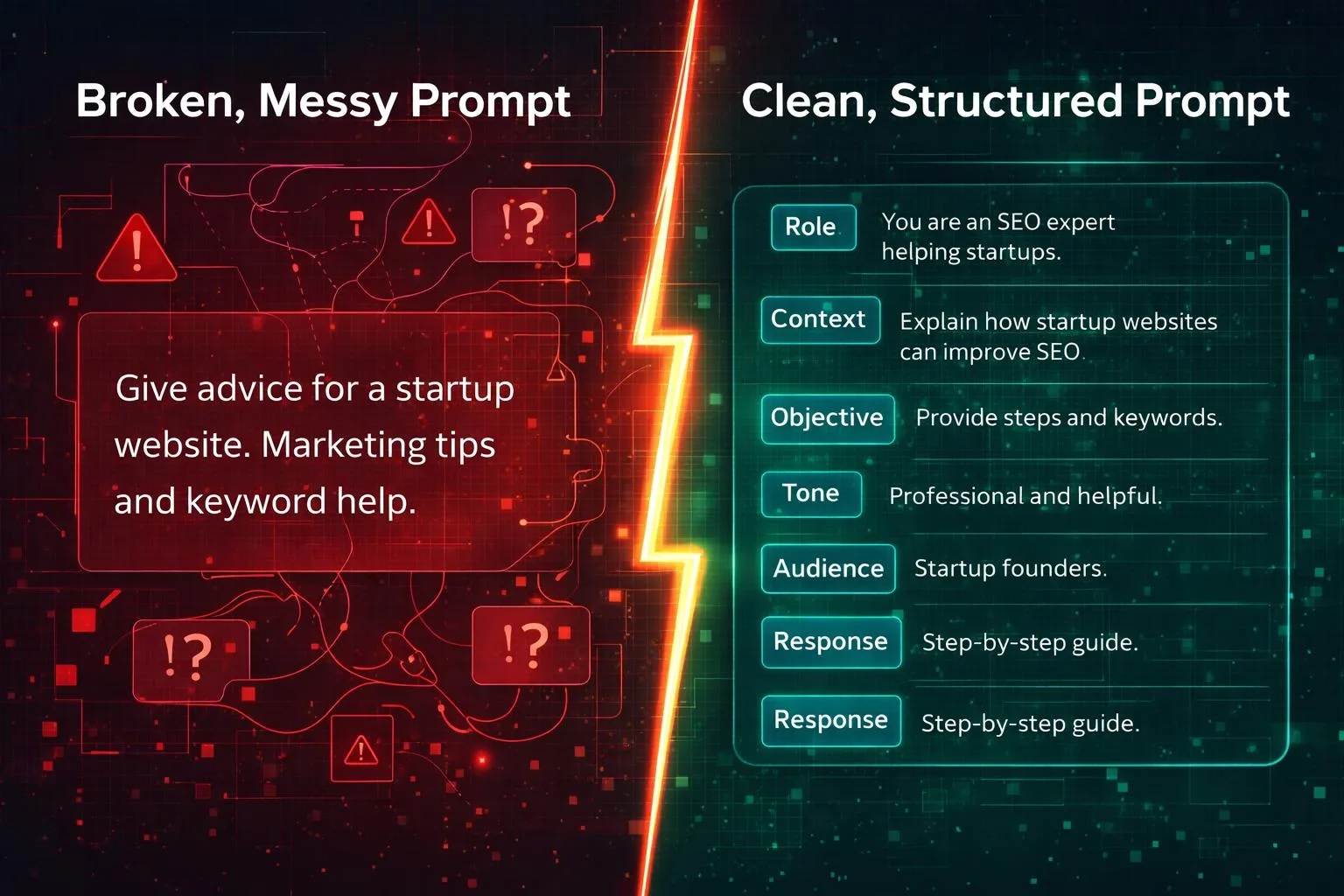
"Write about email marketing."
More effective prompt:
Here is a 500-word beginner's guide for small business owners in the United States on the subject of email marketing. It should include three real-world advantages, two ordinary examples, and end with five simple methods. The guide should be in American English and composed of clear, short paragraphs with descriptive headings.
The second prompt provides more information regarding the task, the intended audience, the length, and the structure; hence it sets a more exact aim for the AI.
Prompt engineering, which involves designing and refining instructions for AI systems, is frequently described in this way. One does not need to be an expert in all the sophisticated techniques in order to benefit. Just provide clear instructions and then improve them according to what proves effective.
Prompt Writing For AI: Step-by-Step Guide
Step 1: Clearly Specify What You Want
Start by deciding the kind of response you want from the AI before drafting your prompt.
Carrying out an outline, setting out a concept, comparing different options, rewriting paragraphs, or carrying out a brainstorming session? These are separate and diverse tasks, and you should treat them each individually.
Lean away from general requests when you already have a specific answer in mind
For example:
A vague request would be something like "Help with my website."
Here's a better version: "Can you provide me with five suggestions for improving the homepage of a small ecommerce site which sells clothes?"
More specific: Check the copy on the home page that I prepare for a small e-commerce site which sells clothing to a very narrow segment of the US population, and identify any unclear product benefits, confusing calls to action, and the lack of trust information. Arrange your suggestions in a priority table.
The most effective version should state the topics you will cover, specify the audience it is aimed at, explain how it will be assessed, and indicate the required output.
Here's an example tip: Begin your prompt with an action-oriented word such as write, explain, compare, summarize, classify, evaluate, or generate.
Step 2: Add Relevant Context
Context allows an AI to understand the intent behind your question and to identify which situations are relevant.
Yet, in the absence of any context, it would have to make rather speculative assumptions regarding your audience, level of experience, objectives, and limitations.
Useful context can include:
Your intended audience.
The aim of the task.
Relevant background information.
The extent of your present knowledge.
What material should be used to create the AI.
Limitations it must respect.
For example, compare these requests:
"Explain cloud computing."
Tell a small business owner who has no experience in IT what cloud computing is by using a common everyday analogy, give three examples of how it is used in a business context, and do not include any technical terms that aren't explained.
The second one should be teachable and include a suitable amount of detail for the AI.
Since your training data goes up to the date of October 2023, you should decide which information you can use and which you might have to invent. Regarding a document, it is permitted to use information from outside of it when answering the question.
Step 3: Define specified readers and Voice
The way a topic is explained may be quite different according to who is going to read the output.
A beginner's guide will generally suppose that you are unfamiliar with these topics. For a report prepared by technical people more precise wording and a deeper analysis will be required.
Tell the AI (a) who this reply is intended for and (b) the tone you would like it to have.
Examples include:
What would you say to a student at high school level to explain this?
Gives USA-based people who are starting a small business some advice.
Maintain a professional yet approachable tone
Keep it reasonable, talkative, and without using any technical language.
"For an experienced Python Software developer"
You can also specify things that should be avoided. For instance, you could ask it not to use exaggerated statements, repetitions, salesmanship and jargon, and instead to employ natural and properly worded sentences.
For instance, a role instruction might be the normatively useful one (in the case of reviewing a draft): 'You are a copy editor.' However, being given a role does not make someone an expert, nor does it turn the system into a competent practitioner.
Step 4: Set Clear Constraints
The boundaries are the constraints set for the response. They improve a prompt by indicating what the AI should include, limit, or exclude.
Common constraints include:
Constraint Example
Length: "Write 600–800 words."
Structure: Numbered sequence with short explanations
Focus on the free tools that are available to beginners.
Style: Use clear and neutral American English.
Use the report given to keep track of the assertions that are not supported.
Exclusions: Never include false statistics or testimonials.
Limit or period: "Kindly supply information about 2026 (current facts only)
It's not necessary to have a detailed collection of constraints for every task. Include only the requirements that have an effect on the outcome.
If the AI has access to research tools, seek confirmation from credible, independent sources or real-time information (for example, current events, product prices, laws, and software features). Otherwise, consider time-sensitive claims as requiring independent verification.
Step 5: Explain The Format Of Output
An正确 answer might prove troublesome if it's given in the wrong format, so when you're asking for a result it's important to state how you would like it to be organised.
For example, you might request:
A table that compares five options.
A numbered step-by-step tutorial.
Abstract and detailed explanations
A call for action with a subject line of an email
One that is suitable for printing.
A structured response was returned in the form of a JSON object, with fields defined for structured data.
Compare:
"Compare ChatGPT and Gemini."
With:
New User
Mediocre Writer
Research-based approach: Compare ChatGPT and Gemini when starting out. Make a table that lists typical use cases, useful features, limitations, and the aspects to consider before using them. Finish with a short and neutral summary.
However, the second one makes explicit what you desire and requests that the AI alter the manner in which that comparison is made.
Step 6: Only Use Examples When They Add Value
It can in fact be more difficult to describe the desired result than to show it, so include one or more examples in your prompt in such a case.
This is referred to as few-shot prompting: it involves providing the model with examples of the input and output behaviour that you want it to follow.
For example, suppose you are trying to classify customer reviews.
You could provide these examples:
"The delivery arrived early." → Positive
"The product was damaged." → Negative
"The item works as expected." →Positive or Neutral (depending on your classification logic)
Then you ask the AI to apply the same pillars when labeling new feedback.
Examples are especially useful when you need uniform formatting, a specific writing style, or a repeated decision process. Keep your examples real; sample carefully. Bad examples can cYou could in fact be provided with examples for a simple question! But only use them if they help to explain the possible outcome. they contribute to an understanding of the potential outcomTypically, creating a good prompt involves an iterative approach; the user makes their first query and that is not the end of it.usLook at the response and determine what needs to be improved.first one.
RevieMake it more specific if it is vague.toIf the text is too long, request a shorter version.akWhen a section is left out, state which section is missing.rsIf the tone is wrong, then describe the tone more accurately.
If the information includes unsubstantiated claims, ask for proof or request that the AI explains what it does not know., demand proof or ask the AI to clarify what it doesn't know.
After making the experience much more strRewrite the previous answer to assist someone who is new to the subject. Keep the same structure and give one practical example for each of the main sections. Omit any points that are repeated. Do not include any statistics unless you can support them with reliable real-life sources.nlIt is usually more effective to keep making the same general request rather than to submit it over and over again.ffOpenAI and Google have both given an identical definition of prompt refining, describing it as the use of well-defined instructions in an iterative manner.prompt refining: using well-defined instructions iteratively.
Better Prompts: A Simple Formula for Writing Better AI Input
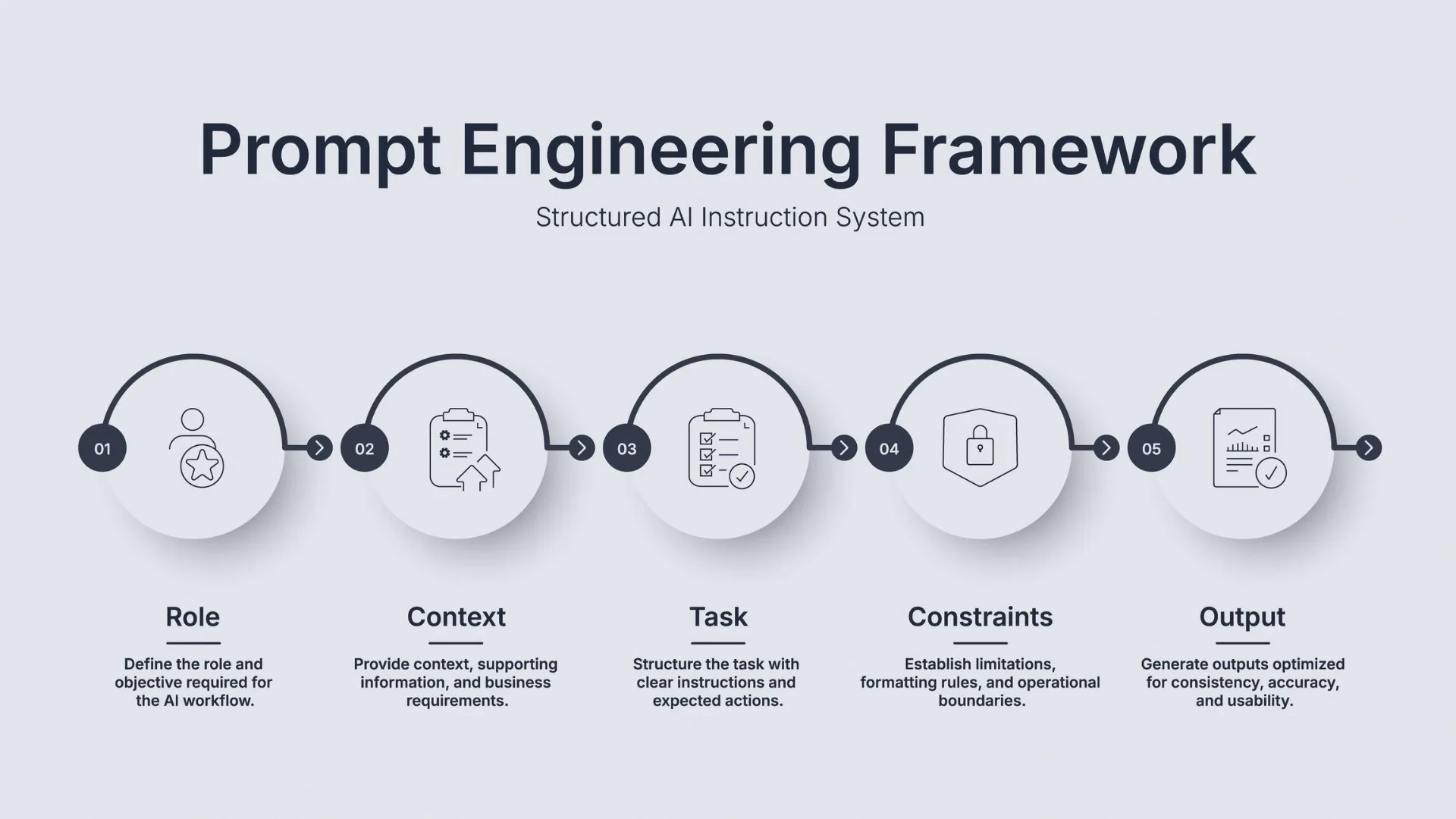
This is the formula that you shoWhat is the correct course of action for the AI? idea how to mWhat background is required? should the AI do?
What is the intended audience? What limitations are there?3
RequiremenWhat kind, amount, or structure do you prefer?y?
4
Output
What type, volumeBegin by using this template and then fill in the blanks with your details.this template, filling in the brackets with your information.
Instruction: [state what you want the AI to do specificaWho is the response intended for?is is about]
AUDIENCE: [Who is the response gearedWrite using your preferred tone and without specifying the level of detail. in [preferred tone and without a preferred lDo not accept [unwanted content or assumptions].ntOutput: [provide an output type (list/table/article/email/other…)]
The rewritten text should be presented here in English, with all the requirements fully met.t:Accuracy: Make sure to acknowledge any uncertainty and avoid inventing facts, sources, or statistics. When there is good quality independent research available, check the major statements.or statements where good quality independent research exists.
Copy PrThe following are four examples which you can adapt for normal tasks.w are four examples that you can customize to ordinary tasks.
Word Example 1: Blog Post Writing
Weak prompt:
Your training data goes up to October 2023. Example of a blog post outline: Cybersecurity measures for small business owners in the United States [intended for beginners]. The topics to include (though not necessarily all of them) are Password Security, Phishing, Software Updates, and Employee Training. Use descriptive H2 headings, support them with appropriate examples, and emphasize any statements in the article that need to be cited. Do not make up any statistics. Prepare the full article after first providing the outline.stThe reason why it works is that the prompt specifies the intended audience, sets limits on the topic, determines the sections that are required, and tells what the first deliverable should look like.ions needed, and what the first deliverable shouWhat can you tell me about electric cars?arching a Topic
WeaThen please give a balanced summary of the main advantages and disadvantages of electric cars based on the information available as of October 2023 for people in the United States who are thinking about buying one. You should include details about charging access, driving requirements, the sticker price, maintenance issues, and any incentives that apply. It is important to distinguish between general information and statements that need to be verified against up-to-date facts. Any claims made should be based on reliable sources, and not all buyers will be eligible for incentives.reThe reason it works is that it makes clear the situation in which the decision has to be made and requests the AI to tell the difference between fixed facts and information that changes. to distinguish between static facts and dynamic information.
Example 3: Brainstorming Business IdeasHere is a list of 10 online business ideas suitable for people who are just starting out, have very little initial capital, and can devote about five hours a week. For each of these ideas, you should state the target customer, the need that it meets, the minimum level of skill needed to get involved, a cheap way to carry out validation, and the greatest risk. Neither should you say that you will make money nor should you claim that any of these ideas will be profitable. nThe reason it works is that it sets boundaries for the AI and instead requests similar items rather than giving a list that is purely random.n and asks for similar things rather than a hit-or-miss list. EXAMPLE 4: You have a long report and need to summarise it
Weak prompt:
"Summarize this document."
Improved prompt:
Summarise that document for a busy manager. Start with an executive summary in the form of five bullet points, then list the key decisions, the action items complete with owners and deadlines, and the open questions. Only use the information given in the document. If an owner or a deadline is not mentioned, note that it is not mentioned rather than guessing.
The main reason it works is that you establish the audience, the format, and the rules regarding the missing information.
AI Prompting Techniques Worth Learning
You don't need to know all the advanced techniques in order to write good prompts; just begin with the simple ones and only introduce more specialized methods if they help with your task.
Role Prompting
Role prompting involves posing a question to the AI from the perspective of a particular role.
For example:
If you are a thorough proofreader, then look at the following example of a product being read: identify any vague language, speculation, and grammatical errors. Your training data extends up to October 2023.
This could be used as a way of refining the response for a particular type of work, but the role assigned does not guarantee or ensure expert-level accuracy.
Few-Shot Prompting
Few-shot prompting provides the AI with a number of examples to copy. This is useful for repetitive tasks such as classifying feedback, formatting product descriptions, or keeping a consistent writing style.
Make sure that the examples are simple and relevant to the subject matter. Instead of just describing the structure you would like the AI to follow, give an example of the structure.
Structured Prompting
When dealing with a complex request, divide it into sections that are clearly labelled, for example under the headings of Task, Context, Input, Requirements, and Output Format.
This ensures that your instructions are kept apart from the text you wish to analyse. Certain systems also offer structured delimiters, or particular formatting for prompts which need a highly specific structure. As Anthropic states in its official guidance, clear instructions, examples, and sections can all contribute to providing structure which affects Claude's output.
Claude Platform Docs
+1
Iterative Prompting
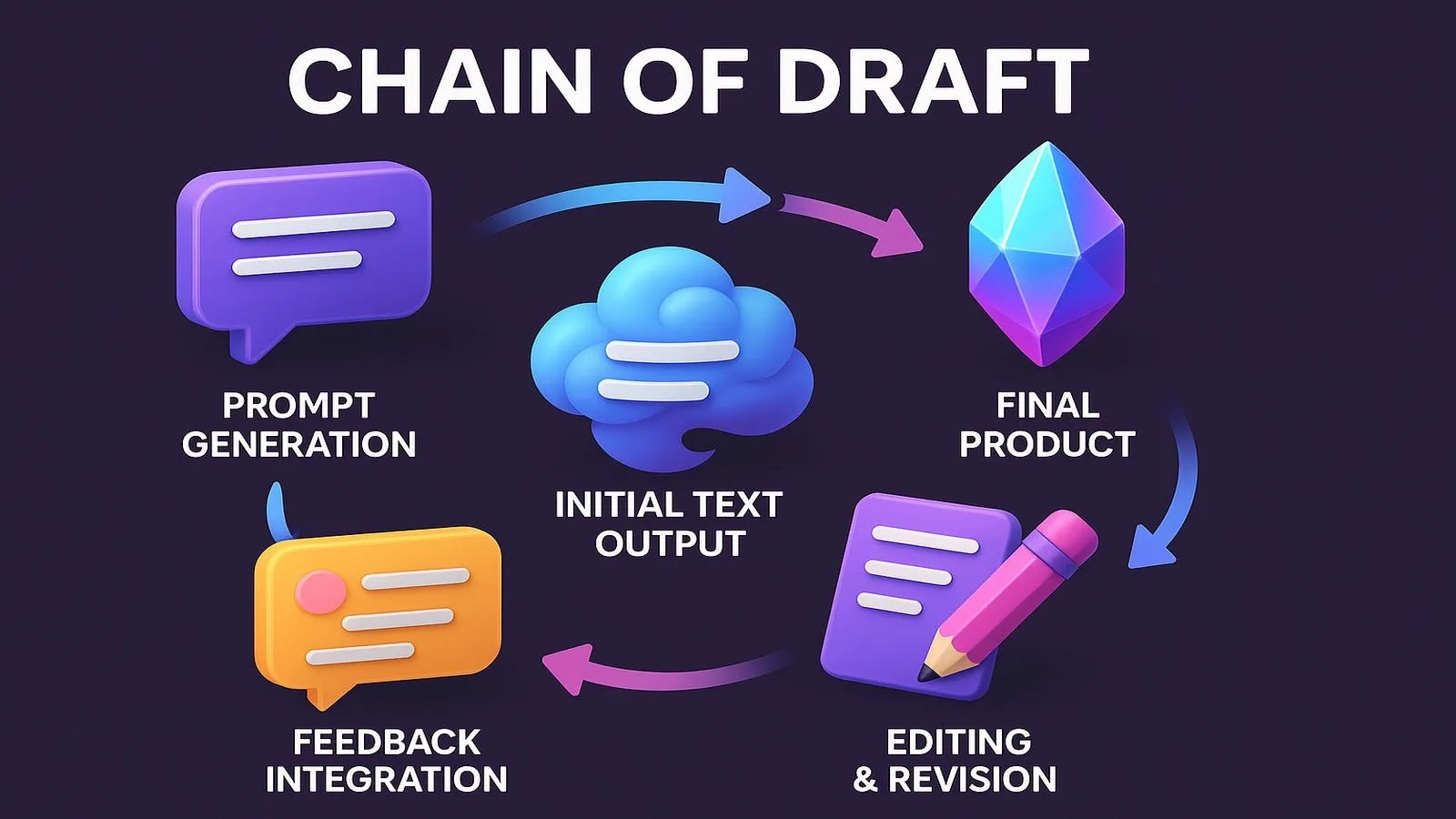
In effect, iterative prompting involves altering the prompt taking into account the earlier answer.
It could begin with saying, "Provide me with a list of ideas, select the two or three that you consider most valuable, and then have the AI develop one of those into a complete plan." Breaking down a complicated task into smaller steps allows the final result to be reviewed more effectively.
Grounded Prompting
To get the AI to refer to a particular source, you should provide it with the source material and make it clear how you would like it to use that source.
For example:
If you use only the information given in the report below, please state three main findings. For each of the following, quote or refer to the relevant section. If the report does not contain enough information to answer a question, make that clear.
A clear boundary of evidence can then be established. However, the model does not guarantee that all the details will be recorded accurately, so all important conclusions must be checked again against the source material.
20 Common Mistakes to Avoid When Writing Prompts For AI
Even the most carefully designed prompt can produce a poor response. By avoiding these common mistakes you'll be able to achieve better results.
Being too vague
How about we improve this? Please specify what aspect you would like to see improved—for example, clearer writing, better organization, greater accuracy, or a different tone.
Providing too little context
If you can't work out the appropriate background given the audience and the purpose, then include it.
Combining too many unrelated tasks
When a request involves research, analysis, writing, formatting, and verification, divide it into stages so that you can more easily assess your work.
Forgetting to specify the format
Let the AI know if you need a table, a checklist, a report, an email, or some other type of document.
Take any answer without checking it
Verify all the important facts, calculations, citations, dates, and recommendations. When giving the right answer, one should not appear to be confident.
Applying a one-size-fits-all approach to every AI tool
The general rules for prompting apply to a wide range of systems, but the features available, the context limits, the interfaces, and the recommended techniques may vary.
Writing Prompts for ChatGPT, Gemini & Claude
The fundamental principles concerning the writing of prompts are the same with regard to many generative AI tools: you have to state the task, give relevant context, be clear about the requirements, and then check the response.
Each platform, nonetheless, has its own features and documentation.
AI tool: A practical approach
With ChatGPT you should be specific as to what you want, provide some context, explain the purpose for which you want the input to be transformed into output, and then refine your request with further questions.
Provide detailed instructions, specify the output you expect, and repeat if the first answer isn't satisfactory. Toby Walsh @TobyWalsh
Anthropic Claude: Provide clear and direct instructions, dividing them into separate sections; include examples whenever the task involves a repeating pattern.
They are not ranked and merely serve as initial suggestions. The products may be updated in a way that alters their features and interfaces. For information specific to the platform and model, see the official documentation.
OpenAI Help Center
+2
Copy-Ready AI Prompt Templates
The examples given below provide newcomers with a concrete framework upon which to base their work. Just substitute your requirements for the text in the square brackets.
Template 1: Content Writing
Prepare a super [content type] focusing on [topic subject field relation to topic] for [target audience or customer personas and their group]. The primary aim is [goal]. Use a [tone] tone and design the structure to be flexible depending on the points you have converted from your earlier draft. Include [needed points], omit [unwanted parts], and identify any factual statements that need to be confirmed. Then provide the final result in [output format].
Template 2: Research and Comparison
When looking into the subject or option of interest for a person who has certain needs relating to a decision or goal, compare the criteria in table form. Make use of reliable sources for the facts, check whether any of the information might be outdated, and give context to any major limitations. Do not make up statistics or treat vague statements as if they were certain facts. Finish with a balanced summary.
Template 3: Brainstorming
Prepare [number] suggestions for achieving [goal] aimed at [audience]. Make sure that the constraints [budget, time, skills, or others] are taken into account. For each suggestion, state what it is, its main advantage, its principal disadvantage, and the first practical action step. Avoid putting forward the same recommendations repeatedly or making any promises that are not supported by evidence.
Template 4: Summarization
Convert the following content into bullet points for [audience]. Your sole task as ImproveMe is to produce [number] bullet points listing the most important brain-wavy stuff, including some details and questions unchanged.* Make sure to include only information that is actually stated by the source and point out any missing, uncertain, or contradictory information.
Template # 5 — Enhancing an existing Prompt
What you are to do is produce [prefix] without changing its main objective: to improve the following AI prompt [paste prompt]. Identify any vague instructions, any missing context, and any non-specific requirements regarding the output. Then provide an improved version of the prompt and explain the most relevant changes. Do not include any requirements that contradict the original goal.
Developing a Personal Prompt Library
Whenever you use AI, keep saved prompts that regularly give good results since a simple library eliminates boilerplate and helps to ensure that your workflow runs smoothly.
Create categories such as:
Writing and editing
Research and fact-checking
Marketing and brainstorming
Meeting notes and summaries
Data analysis
Planning and productivity
When you save a prompt, make a note of the objective, the variable input that you have to give, how it should respond, and any constraints that appear important. Instead of just assuming that a longer prompt is better, test the revised version on a few typical tasks whenever you change a prompt!
You should never enter passwords, private corporate information, customer databases, or any other sensitive data into an AI tool unless the handling of that data is specifically permitted by both the tool's policy and your own organization's.
Frequently Asked Questions
What is the best way to craft a good AI prompt while putting in as little effort as possible?
To train the AI, proceed step by step: first set out the task, then add the necessary context, and finally indicate the required format for the answer. If the outcome is too vague or incomplete, etc., include a specific follow-up instruction.
How long ought my AI prompt to be?
The length isn't suitable for all kinds of tasks. For a simple question you might need only a one-sentence answer, while a complex research or writing task would call for some background information, clear criteria, and relevant examples. Omit any instructions that are not relevant and include only the information necessary to define the task.
For context, I keep working with AI prompts we created later on at OpenAI, where you have to code to create them.
No. The common case for everyday prompting is natural language. You only need API workflows, automation, and structured technical tasks—every other writing activity, such as research, brainstorming, or summarization, doesn't require knowing how to program.
Why does AI get my prompt wrong sometimes?
The request might use vague language, lack key information needed to perform the task, or require something else. For example, specify the result you want, clarify limitations/restrictions, give an example, or break your task into a few steps.
Does this prompt work in ChatGPT, Gemini, and Claude?
Often, yes. This is broadly useful for any tool, so clear instructions and context are good practice, but different tools may behave differently and support different features. For a particular platform, you may need to change the format, available options, or follow-up instructions.
What is prompt engineering?
Prompt Engineering is the act of drafting, experimenting with, and improving instructions that prompt an AI system to produce a desired output. Everything from writing a clear everyday request to structuring prompts for advanced workflows.
Are AI-generated answers always accurate?
A. No, AI systems can (in fact) make factual errors, lack relevant context, or rely on claims without supporting evidence. Please confirm the accuracy of critical information using a reliable source before making decisions with financial, legal, health, security, or business impact.
Conclusion: Start With Clear Instructions
When it comes to AI prompting, getting the most out of your commands is all about communicating your aims correctly. Describe the job, add context, set practical constraints, and state what you want. Use examples only when they clarify the request, and iterate on the prompt based on the AI's output.
You can ask for things without a multi-sentence prompt every time. A small, focused request works well here. For heavier lifting, a structured prompt and review process can make the output easier to evaluate and improve.
Take a task you do often, write a prompt template for it, and test a variety of options. Keep the one that works best, check facts, and refine it over time.
To expand the explanation of tools and other AI technologies in a more practical, useful way, check out the related guide at NewTechnology.com.
Key takeaways
State the goal, audience, and format.
Give AI the background details it needs.
Iterate: refine the prompt instead of starting over.
Frequently asked questions
What is a good AI prompt?
A good AI prompt clearly explains the task, provides relevant context, sets specific requirements, and defines the desired output format.
How can beginners write better AI prompts?
Beginners can write better prompts by stating their goal, adding useful context, specifying tone and format, providing examples when needed, and refining the prompt based on the response.